NANO V3.0 CH340C with 0.91″ OLED Development Board
$32.36
$53.07
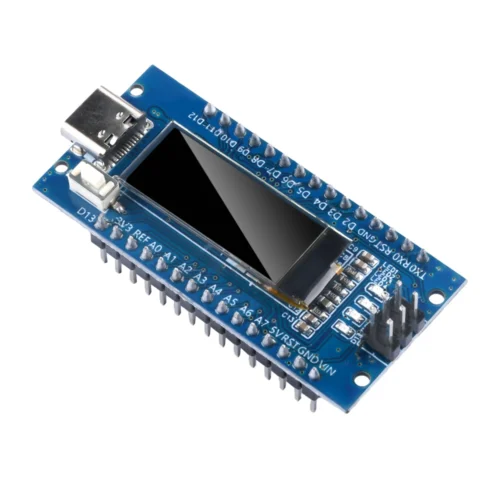
The Nano V3.0 Atmega328P Ch340C with a built-in 0.91″ OLED display is an all-in-one, breadboard-friendly development board that combines the functionality of an Arduino Nano with an integrated screen. This eliminates the need for extra wiring and breadboards for display functionality, streamlining the prototyping process.Key Features:Microcontroller: ATmega328P, the same as the classic Arduino Nano.USB to Serial Chip: CH340C, a cost-effective alternative to the FT232RL found on official boards.USB Ports: Available with a choice of a Mini-USB, Micro-USB, or USB-C interface, depending on the specific model.OLED Display:Size: 0.91 inches.Resolution: 128 x 32 pixels.Driver: SSD1306.Interface: I2C, which uses the Nano’s A4 (SDA) and A5 (SCL) pins.Input/Output:Digital I/O Pins: 14 (with 6 providing PWM output).Analog Input Pins: 8 (A0-A7).Serial Communication: 1 pair of TTL level serial transceiver ports (RX/TX).Power Options:USB Power: 5V supplied via the USB port.External Power (VIN): 6–12V DC via the VIN pin.How to use the built-in OLED:To program and use the built-in OLED screen, you will need to follow these steps using the Arduino IDE: Install the CH340 Driver: If you are a Windows user, you may need to install the CH340 serial driver for your computer to recognize the board.Install Libraries: Use the Arduino IDE’s Library Manager (Sketch > Include Library > Manage Libraries) to install the Adafruit GFX and Adafruit SSD1306 libraries, which are required for controlling the display. The U8g2 library by oliver is also a popular alternative.Configure the IDE:Board: Select Arduino NanoProcessor: Select ATmega328P (or the “Old Bootloader” version if the upload fails).Connect and Code: The OLED communicates via the I2C interface, using the standard pins A4 (SDA) and A5 (SCL), which are hardwired on the board. You can use the Adafruit libraries to write text and graphics to the display.Uses:The integrated OLED screen is useful for a variety of projects that require a simple, direct output without the hassle of wiring an external display. Sensor Monitoring: Displaying real-time data from temperature, humidity, or other sensors.Device Status: Showing the operating mode, battery level, or other status information for a portable device.Custom Interface: Creating a simple menu or visual feedback for a user.Debug Tool: Viewing diagnostic messages during development.